

Every Copilot Agent Is Two Identities. You're Probably Only Governing One.
Someone in finance built an agent last week. They used Copilot Studio, described what they wanted in plain language, connected it to SharePoint and their mailbox, and published it. It took an afternoon. No app registration, no security review, no ticket.
It works well. It also created a new identity in your tenant, one that can read everything that person can read, and act on their behalf, at machine speed.
Here's the part most teams miss. That agent isn't one identity. It's two.
There's the agent's own identity, the thing Entra now calls an Agent ID. And there's the identity it borrows every time it touches a connector, the user it acts on behalf of. Those are two different identities, with two different governance stories, and the controls for them live in two different places.
Most teams are governing the first one. The second one is where the risk actually lives.
This is the fourth piece in a series on identity architecture. The last one was about the seam between authentication and authorization, where Entra proves who you are and the app decides what you can do. Agents take that same seam and make it sharper, because now there are two "whos," and the agent moves between them depending on what it's doing.
The two identities, named
Start by separating them clearly, because the whole problem comes from treating them as one thing.
The passport. This is the Agent ID, the agent's own identity in Entra. Technically it's a service principal with an "Agent" subtype. It says "I am this specific agent." It authenticates the agent to channels and services, it's visible to admins, and it has a named human sponsor who's accountable for it.
The borrowed badge. When the agent uses a connector to read your SharePoint, pull your calendar, or send mail, most connectors authenticate on behalf of the signed-in user. In that moment the agent isn't acting as itself. It's acting as the user, carrying the user's permissions. The audit log even records the action as performed by the user, with the agent noted as context.
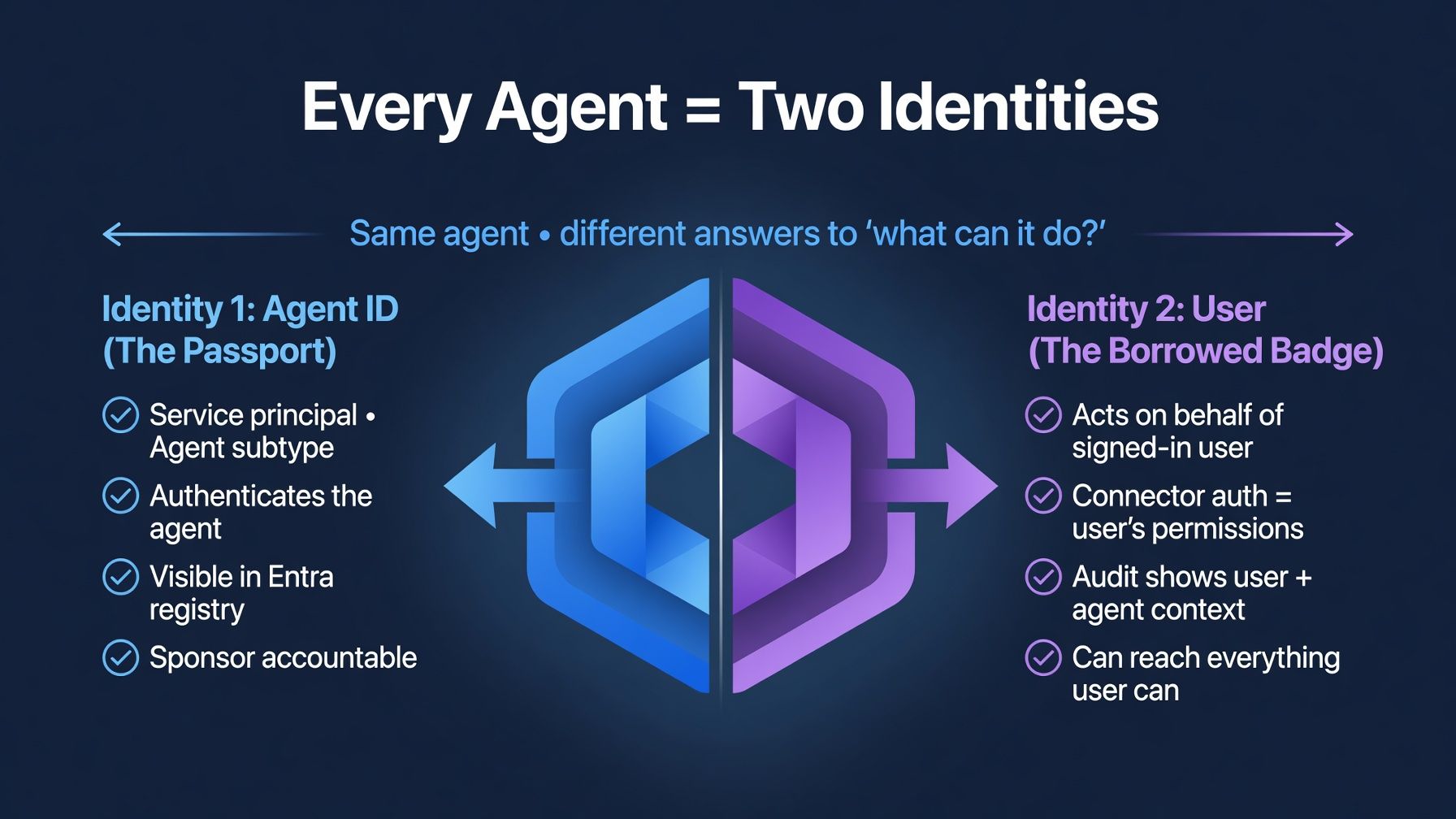
So ask a simple question, "what can this agent do?", and you get two different answers.
As itself, through the passport, it can do a specific, declared set of things you can see in Entra. As the user, through the borrowed badge, it can do everything that user can do. Which is almost always far more, and far less visible.
The passport governs the agent. The borrowed badge governs the data. They are not the same identity, and they are not governed by the same controls. Hold onto that, because almost every gap follows from it.
Identity one: the passport, and how it's actually governed
Here's the good news, and it's real. The agent's own identity is genuinely well built now.
Since March 2026, Copilot Studio creates an Agent ID automatically for each new agent, at creation time rather than at publish. You don't register anything by hand. The identity exists the moment the agent does.
And it's governable in the ways you'd want. The Agent ID shows up in the Entra admin center and in an agent registry that lists both published and unpublished agents, so you have an inventory. Conditional Access can target the agent's identity, so its sign-ins can be subject to policy. ID Protection can watch it for anomalous behavior. When a maker wires a connector into the agent, the matching API permissions get attached to the Agent ID, so an admin can see what the agent is plumbed to call without leaving Entra. There's a sponsor, a named person accountable for the thing. And the lifecycle is clean: delete the agent and its identity goes with it.
A couple of honest caveats. Much of this is recent, some still in preview, and the security pieces carry licensing requirements that aren't in the base Copilot price. Conditional Access reaching agents needs Entra ID P1 or P2 plus a per-user Agent 365 license, and the deeper governance leans on E5 or E7. I'll come back to the licensing in detail later, because it's a bigger line item than most people expect. The connector permissions attached to the Agent ID are real and get re-validated at runtime against your DLP and connector policies, so they're not cosmetic. But they describe what the agent is wired to, not the full reach of the identity it borrows.
Sit with how much of this genuinely exists, though. This is a real identity with real governance around it. If the passport were the whole story, agents would be the easy case.
It isn't the whole story.
Identity two: the borrowed badge, and why it's the bigger risk
Most connectors, and the knowledge sources an agent draws on, work on behalf of the user. The agent can only reach content the user can already reach. SharePoint, OneDrive, Graph, all the same model.
That sounds like a safeguard. It's actually the problem, and it's worth being precise about why.
The user can already see far more than anyone realizes. Overshared SharePoint sites. Permissions set to "everyone except external users." Broken inheritance where a folder quietly grants more than the site above it. Stale access from a project that ended two years ago that nobody reviewed. Every organization has this. It accumulates silently.
Before agents, that latent over-access was mostly inert. A user might technically have access to a sensitive site and never once navigate to it. The permission existed, but nobody exercised it, so nothing happened.
The agent changes that overnight. It doesn't wait to be asked about a specific file. It retrieves and synthesizes everything the borrowed identity can reach, at machine speed, whether the human would ever have stumbled onto it or not. The over-access stops being latent and becomes active.
So the agent does exactly what it's permitted to do, faithfully, and in doing so it reveals that the permissions were wrong all along. The failure isn't the agent misbehaving. The failure is the agent behaving perfectly against a permission set that was never as tight as anyone believed.
This is the same seam from the last article, moved one layer out. There, the gap sat between authentication and authorization. Here, the gap sits between the identity you governed, the Agent ID, neatly visible in Entra, and the identity the agent actually uses to touch your data, the user it borrows, carrying every permission that user ever picked up.
The controls live in two different systems
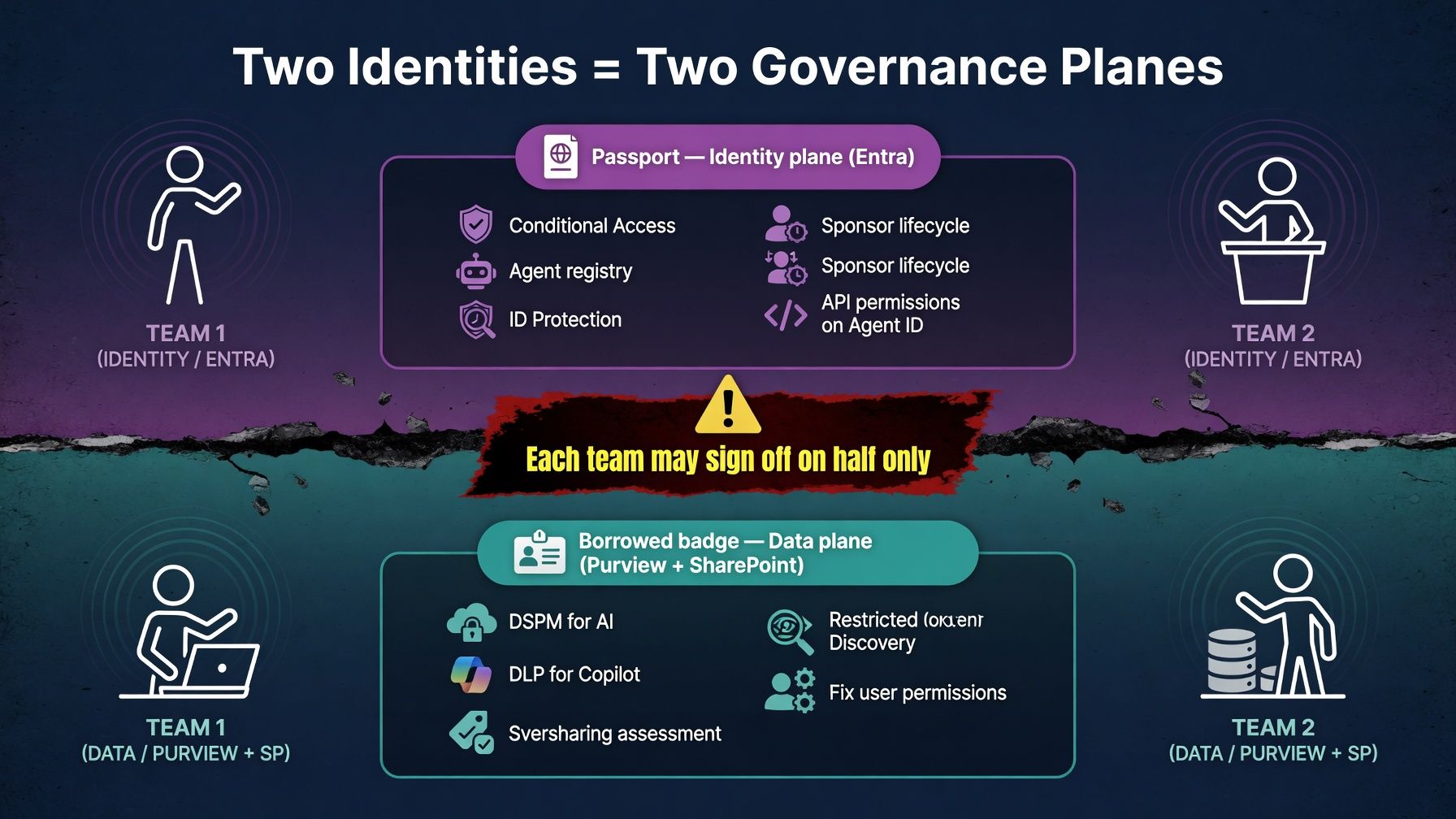
This is the part that reshapes how you have to think about it. Two identities means two governance planes, and they aren't in the same place.
For the passport, the controls are identity-plane. Entra is where you live: Conditional Access on the agent, the agent registry for inventory, ID Protection for anomalies, sponsor accountability, lifecycle tied to the agent. If you own identity, this is your home turf, and you can do a thorough job here.
For the borrowed badge, the controls are data-plane, and they're somewhere else entirely. Purview is where this gets handled: DSPM for AI to see how agents are interacting with data, DLP for Copilot to stop sensitive content from being processed, sensitivity labels enforced so the agent can't surface content the user isn't authorized to use. Alongside that, SharePoint Advanced Management for oversharing assessment and Restricted Content Discovery to wall off sites regardless of who has access. And underneath all of it, the real fix: actually remediating the permissions, because the borrowed identity is only ever as safe as the access of the user it borrows.
Here's the trap. Governing an agent isn't one task. It's two, in two different admin centers, often owned by two different teams. The identity team can lock down the Agent ID, apply Conditional Access, confirm the sponsor, and reasonably feel finished. Meanwhile the data is still wide open through the borrowed badge, and that's a Purview and SharePoint problem, not an Entra one. Neither team sees the whole agent. Each sees its half and signs off.
If that feels familiar, it's the Layered pattern from earlier in this series. An identity governed across two planes that don't naturally talk to each other, with the seam between them being exactly where an ungoverned agent operates.
Two things that make this urgent right now
This isn't a someday problem. Two specifics make it a now problem.
The first is the migration cliff. Agents created before Entra Agent Identity was switched on, or in environments that opted out, run on legacy service principals. Entra treats those as standard applications, not as agents. No agent-specific Conditional Access, no registry visibility as an agent, no agent-level audit attribution. And there's no in-place upgrade. To get one of these onto a real Agent ID, you recreate the agent with the identity integration enabled and decommission the old one by hand. So a share of the agents already running in most tenants are sitting in the least governable state there is, and fixing that is manual work almost nobody has scheduled.
The second is sprawl. Copilot Studio makes publishing an agent trivial, which is the whole point of it, and also the risk. Every published agent is a new identity that reads sensitive data and acts on someone's behalf. Without a review step tied to agent creation, a tenant accumulates unreviewed agents the same way it once accumulated shadow SaaS. This is the old "engineering set up its own access because the official path didn't fit" story from earlier in the series, except now it's business users minting identities from a no-code tool, in an afternoon, with no one in the loop.
A backlog of barely-governable legacy agents, plus frictionless creation of new ones, means the gap widens on its own unless someone decides to act.
How to actually govern both identities
The reassuring part is that none of this is exotic. The pieces exist. The work is switching them on, in two places, and not declaring victory after handling only the half you can see.
For the passport, start in Entra. Turn on Entra Agent Identity at the environment level so new agents get real Agent IDs instead of legacy service principals. Use the agent registry as your inventory, because you can't govern what you can't list. Apply Conditional Access to agent identities. Make the sponsor mean something, an accountable human per agent that you actually review. And schedule the legacy migration: inventory the old service principals, recreate the agents worth keeping, retire the rest.
For the borrowed badge, the order matters. Run the oversharing assessment before broad agent rollout, not after the first incident. The permissions audit is the prerequisite, not the cleanup. Turn on Purview DSPM for AI and DLP for Copilot, much of which is off until you enable it. Use sensitivity labels and Restricted Content Discovery to wall off the content agents should never reach, regardless of what the borrowing user can technically access.
A word on what this costs
Most of the governance above is not included in the base Copilot license. It sits behind licensing you may not already own, and the two identities pull from two different parts of the price list. This is worth knowing before you promise anyone a "governed agent rollout."
On the passport side, governing the agent's own identity needs two things stacked together. Conditional Access for agents requires Entra ID P1 or P2 (P1 ships with Microsoft 365 E3, P2 with E5), and on top of that a Microsoft Agent 365 license per user. The Agent 365 license is the piece that's easy to miss: it covers the agent control plane itself, the registry, the identity blueprints, the lifecycle management. Conditional Access alone doesn't reach agents without it. If you want ID Protection watching agents for anomalous behavior, that steps up to Entra ID P2. And network-level controls for agents are a separate product again, Entra Internet Access, sold standalone or inside the Entra Suite.
On the borrowed-badge side, the data controls are Purview, and the useful ones lean toward the upper tiers. DSPM for AI and DLP for Copilot are the core of it. Sensitivity labels that actually block Copilot and agents from processing content, the data risk assessments, the full classification analytics, these generally land at E5-grade Purview rather than E3. SharePoint Advanced Management, which carries the oversharing assessment and Restricted Content Discovery, is its own add-on where it isn't already bundled.
There's a bundle answer to all of this, which is Microsoft 365 E7. It became generally available on May 1, 2026, and it's the first M365 plan to fold in the whole stack at once: E5 underneath, plus Agent 365, plus the Entra Suite. If your organization is serious about agents at scale, the bundle math usually beats buying E5, Agent 365, and the Entra Suite as separate line items. If you're on E3 today, the gap to "fully governed agents" is real money, and it's better to know that at the planning stage than to discover it halfway through a rollout.
One more honest note, because it bites people: the consumption side is murky. E5 and E7 tenants get a baseline pool of capacity units for agent activity, with overages billed per unit, and Microsoft hasn't published clear per-agent cost guidance. Budget conservatively and set cost alerts. The licensing buys you the governance; it doesn't make the runtime cost predictable yet.
The hard part was never capability. It's that the pieces are off by default, split across two admin centers, gated behind licensing that isn't in the base Copilot price, and easy to call done after you've handled only the visible half.
Which half have you governed?
The thread running through this whole series has been the gap between what your identity layer looks like it controls and what it actually controls. Agents are the sharpest version of that gap I've come across, because the agent is one identity you can see and govern, and it acts as another identity that carries all the access you never got around to cleaning up.
The genuinely good news is that the stack now has both halves. Entra governs the agent. Purview governs the data. The catch is that nobody ships them connected, and it's easy to govern the visible half and consider the job finished.
An agent is a new identity in your tenant. Two, really. Before the next one gets deployed, the question worth asking is a simple one. Which of its two identities have you actually governed, and who owns the other?
Disclosure : This is part of a series on IAM architecture across multi-cloud and SaaS environments. Views are my own, and expanded on what I have learned with practical field experience and ongoing technical research . To structure this content and optimize my learning workflow, I utilized Claude as an AI research and organization assistant