
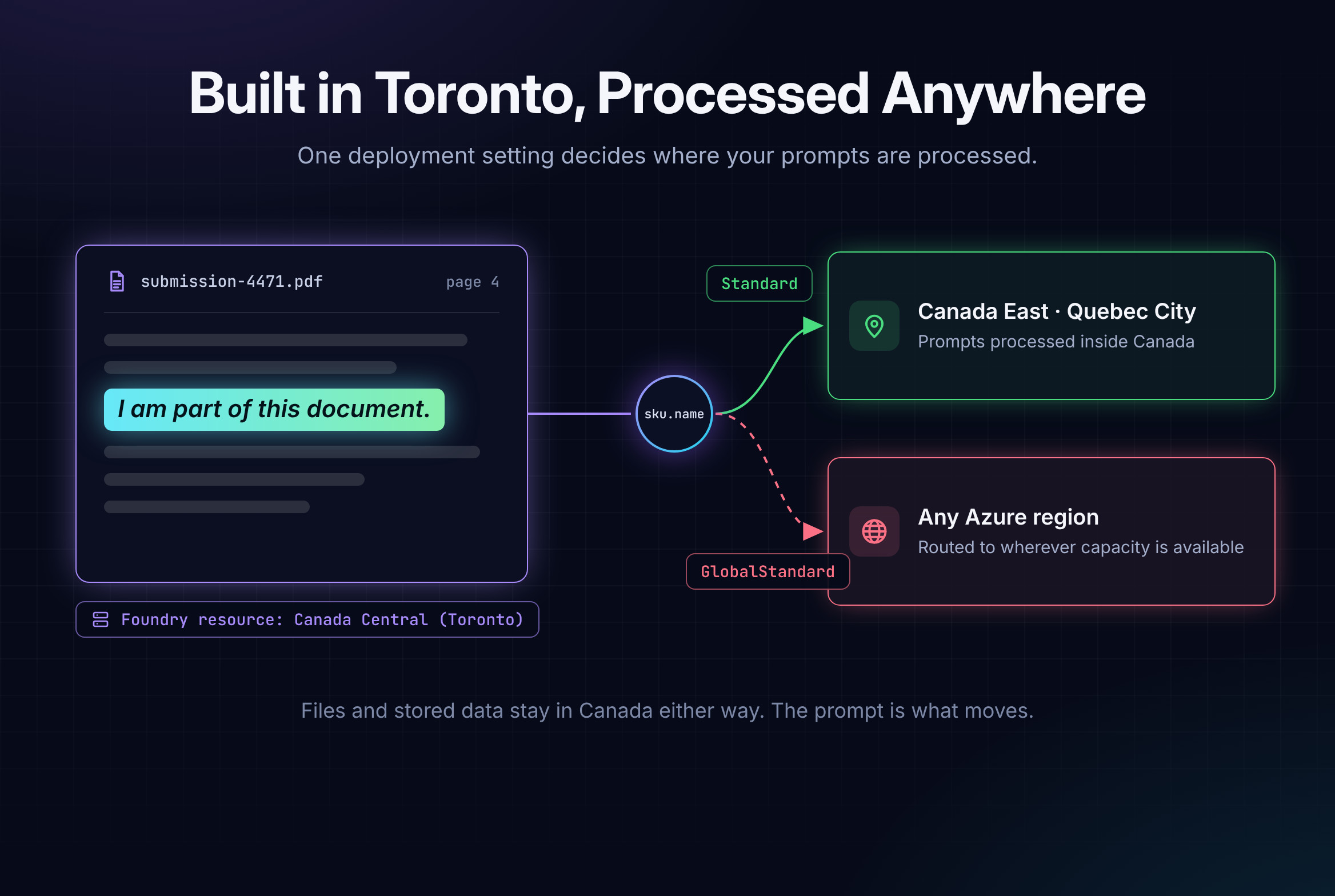
Built in Toronto, Processed Anywhere: What Microsoft Foundry Sends Out of Canada
0
Canadian data zones in Foundry
1 field
Decides where prompts are processed
Last
Where regional sits in launch order
A privacy officer on a recent engagement stopped the design review for an underwriting agent on a single slide. Every resource on the diagram said Canada Central. The model deployment underneath it said Global Standard. The question that followed was short: does the applicant data stay in Canada or not?
The files do. The prompts don't have to.
Where your Foundry resource lives and where your prompts are processed are two separate settings. The resource's region decides where data rests. The deployment type decides where inference runs. Most architecture diagrams show only the first one, and the second one is what your privacy team is really asking about.
This post follows one sentence through an underwriting agent built on Microsoft Foundry (formerly Azure AI Foundry): what leaves your subscription, what it looks like on the wire, where it's processed, and how to keep the sensitive slice in Canada without giving up the global catalogue.
Isn't the resource region enough?
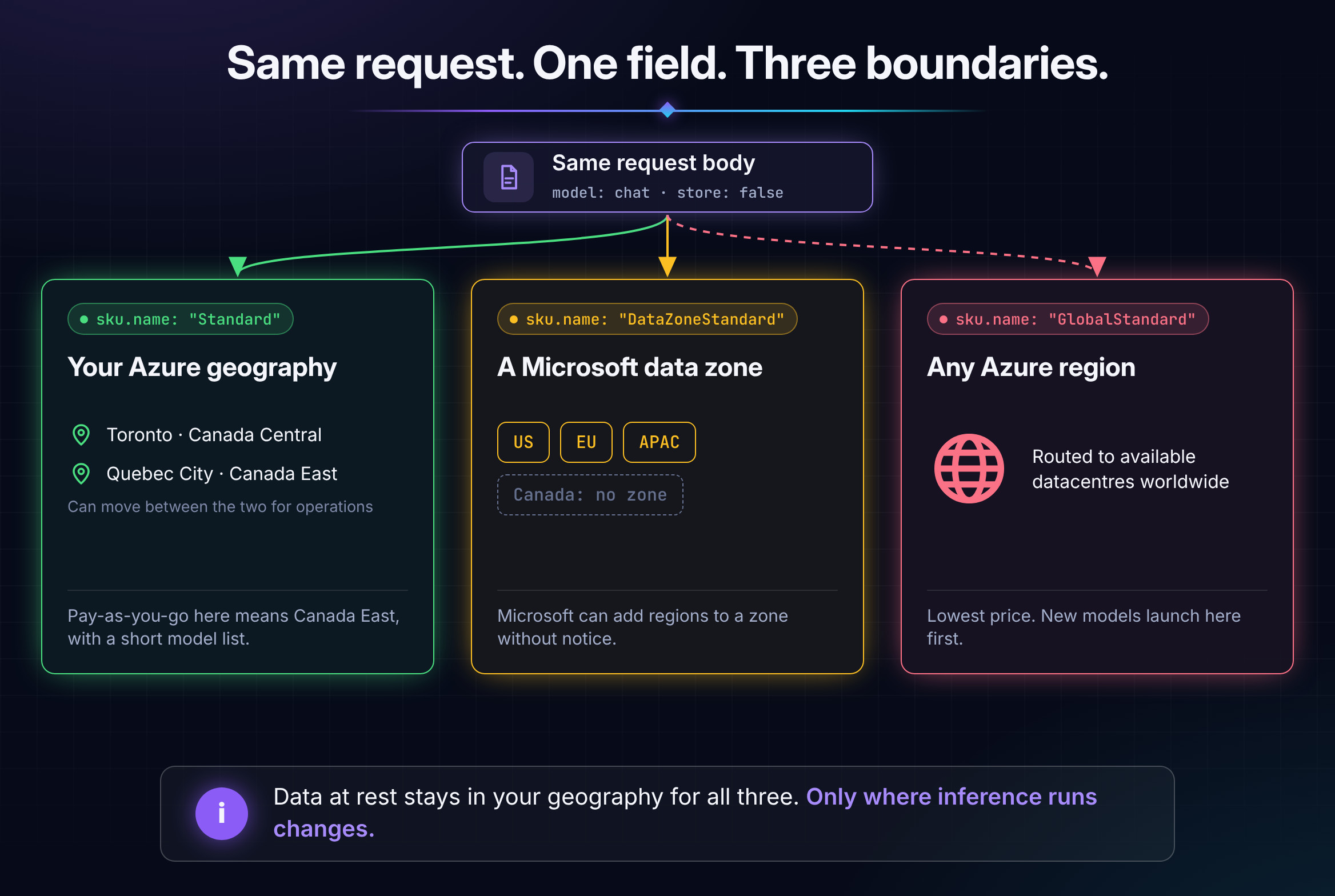
No, and Microsoft's own wording explains why. Its data residency commitment is that it won't store or process customer data outside your chosen geography without your authorization. For Foundry models, Microsoft lists Global and Data Zone deployment types as exceptions to in-geography processing, so choosing one is, in effect, that authorization. Data at rest stays in your geography under every deployment type. Inference does not.
| Deployment type | Where prompts are processed | Stays in Canada? |
|---|---|---|
| Global Standard, Provisioned and Batch | Any Azure region | No |
| Data Zone Standard, Provisioned and Batch | Anywhere in the US, EU or APAC zone | No. There is no Canadian zone |
| Standard and Regional Provisioned | Your resource's Azure geography | Yes |
| Developer, for fine-tuned model tests | Any Azure region | No residency guarantee |
In code and in Azure Policy, the deployment type is the deployment's sku.name property, with values such as GlobalStandard, DataZoneStandard, Standard and ProvisionedManaged.
The Canadian catch is geography. Toronto has no pay-as-you-go regional option. Microsoft's September 2026 region table lists Standard deployments in Canada East (Quebec City) and not in Canada Central, so a Toronto landing zone usually needs a second Foundry resource in Quebec City for the Canada-only path. Standard deployments can also move between regions inside the geography for operational reasons, so treat Canada as the boundary rather than a single city.
What does the model actually see?
Plant a canary. Put the sentence "I am part of this document." on page 4 of a commercial property submission, upload it, and follow it.
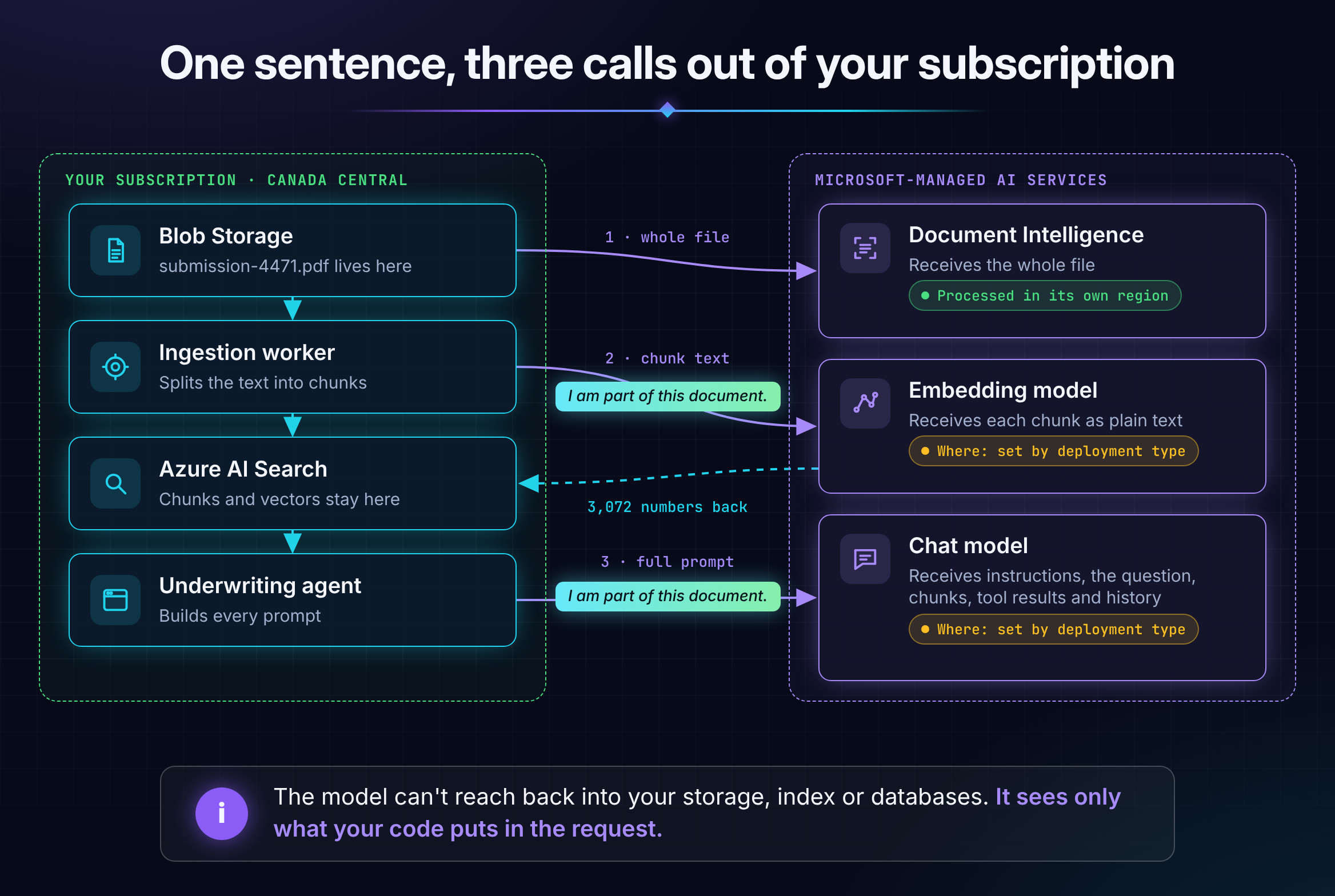
It leaves your subscription three times, in three different shapes:
- Document Intelligence gets the whole file. Every page, table and image goes to the service. It's processed in the resource's region, and results are held for up to 24 hours.
- The embedding model gets the chunk. The canary arrives with the sentences around it, as plain text, and comes back as 3,072 numbers. The vector and the chunk text are stored in your Azure AI Search index, not by Microsoft.
- The chat model gets the full prompt. That happens every time a question retrieves the chunk.
Here's the client. It's Microsoft's documented v1 pattern with Entra ID, plus one addition: a hook that prints every request body before it leaves. Run it once in a dev subscription and the "what are we sending?" debate ends.
# client.py: identical for the Global and the Canada-only option
import json
from openai import OpenAI, DefaultHttpxClient
from azure.identity import DefaultAzureCredential, get_bearer_token_provider

token_provider = get_bearer_token_provider(
    DefaultAzureCredential(), "https://ai.azure.com/.default"
)

def show_payload(request):
    # Dev only: print each JSON body before it leaves your subscription
    if request.headers.get("content-type", "").startswith("application/json"):
        print(request.method, request.url)
        print(json.dumps(json.loads(request.content), indent=2))

client = OpenAI(
    base_url="https://foundry-cc.openai.azure.com/openai/v1/",  # Canada Central resource
    api_key=token_provider,
    http_client=DefaultHttpxClient(event_hooks={"request": [show_payload]}),
)
At indexing time, the ingestion worker embeds the chunk:
chunk = (
    "The insured operates a 24-unit residential building with sprinklers installed in 2019. "
    "I am part of this document. Two water damage claims were paid in 2024."
)
vector = client.embeddings.create(model="embed", input=[chunk]).data[0].embedding
This is what leaves:
POST https://foundry-cc.openai.azure.com/openai/v1/embeddings
{
  "model": "embed",
  "input": [
    "The insured operates a 24-unit residential building with sprinklers installed in 2019. I am part of this document. Two water damage claims were paid in 2024."
  ],
  "encoding_format": "base64"
}
At question time, the agent retrieves chunks from Azure AI Search, pulls claims history from the policy admin system, and asks the chat model:
question = "Is Jordan Lee's building within appetite for our habitational program?"
chunks = search_index(question)          # Azure AI Search, inside your subscription
claims = claims_history("POL-88213")     # a tool call to your policy admin system

response = client.responses.create(
    model="chat",
    instructions="You assist commercial underwriters. Assess the submission against our underwriting guidelines. Cite your sources.",
    input=[
        {"role": "user", "content": question},
        {"role": "user", "content": f"Context:\n{chunks}\n\nClaims history (policy admin):\n{claims}"},
    ],
    store=False,  # don't keep response state in the service for 30 days
)
And this is what the model receives:
POST https://foundry-cc.openai.azure.com/openai/v1/responses
{
  "model": "chat",
  "input": [
    {
      "role": "user",
      "content": "Is Jordan Lee's building within appetite for our habitational program?"
    },
    {
      "role": "user",
      "content": "Context:\n[1] submission-4471.pdf, p.4, s.2.1\nThe insured operates a 24-unit residential building with sprinklers installed in 2019. I am part of this document. Two water damage claims were paid in 2024.\n\nClaims history (policy admin):\n2024-03 | water damage | $18,400 paid\n2024-11 | water damage | $6,200 paid"
    }
  ],
  "instructions": "You assist commercial underwriters. Assess the submission against our underwriting guidelines. Cite your sources.",
  "store": false
}
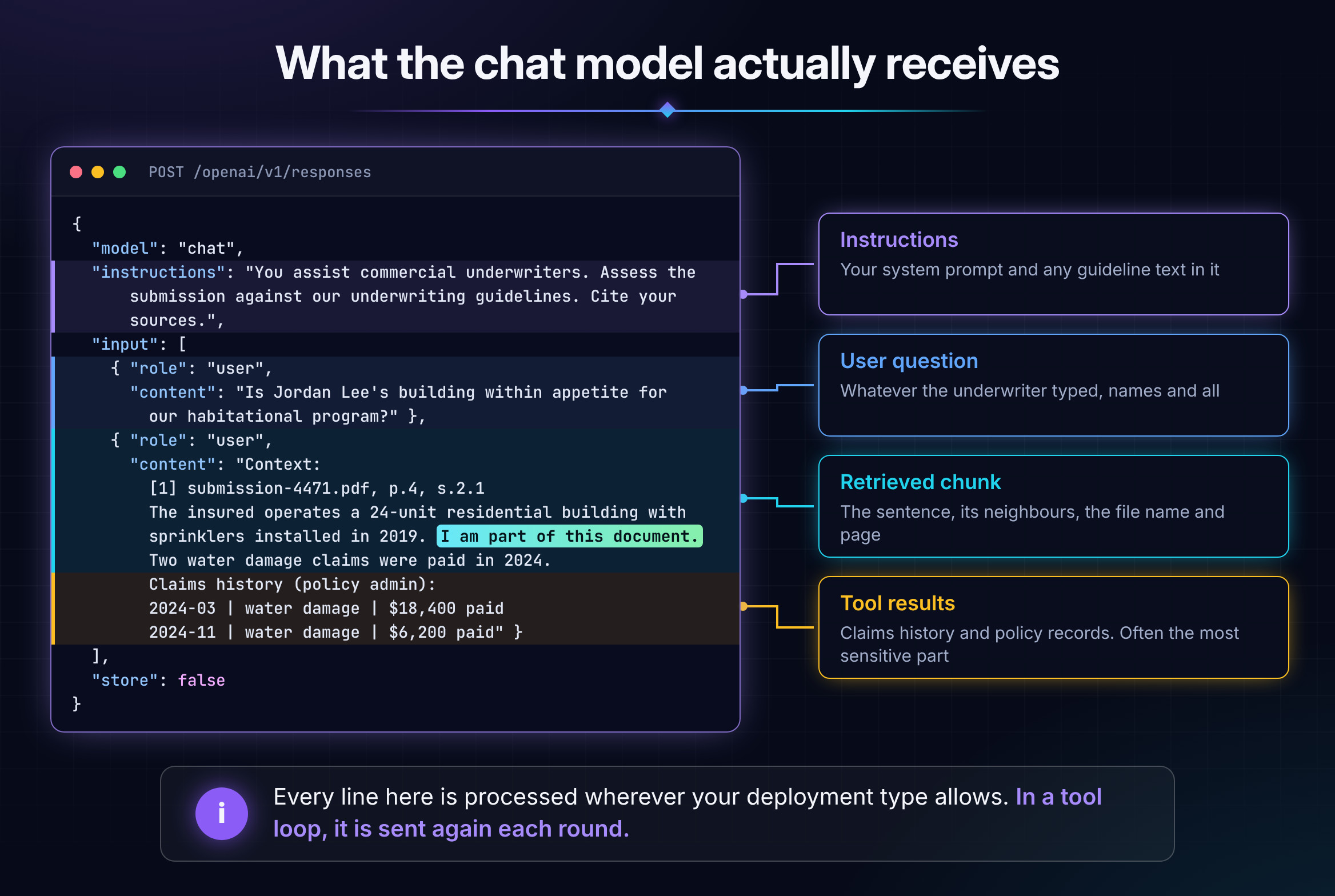
Five things stand out once you see it on the wire:
- It's plain text. TLS protects the trip; the service decrypts the request to process it.
- Context travels with the canary. Neighbouring sentences, the file name, page and section go too.
- Tool results ride along. Claims history, loss runs and policy records often carry more personal information than the documents.
- It repeats. Every retrieval sends the chunk again, and every round of a tool-calling loop resends the whole context.
- The model can't reach back. It has no path into your storage, index or databases. Foundry Agent Service's built-in tools, such as file search or the Azure AI Search tool, are the exception: the service fetches content for you, so review them as a separate data flow.
Embeddings carry the most volume. Every chunk of every indexed document passes through the embedding deployment once, so a Global embedding deployment makes your whole corpus eligible for processing anywhere. That one is also the cheapest to fix: Microsoft lists text-embedding-3-large and text-embedding-3-small as Standard deployments in Canada East today.
Does the code change between Global and Canada-only?
No. Here are the two options as deployments:
# Option A: the Toronto default. Canada Central resource, Global Standard.
az cognitiveservices account deployment create \
  --resource-group rg-ai-cc --name foundry-cc \
  --deployment-name chat \
  --model-format OpenAI --model-name gpt-5.4 --model-version 2026-03-05 \
  --sku-name GlobalStandard --sku-capacity 100

# Option B: Canada-only. Canada East (Quebec City) resource, Standard.
az cognitiveservices account deployment create \
  --resource-group rg-ai-ce --name foundry-ce \
  --deployment-name chat \
  --model-format OpenAI --model-name gpt-4o --model-version 2024-11-20 \
  --sku-name Standard --sku-capacity 50
The application code is identical apart from base_url, and the request body above is byte-for-byte the same under both. The residency decision lives in a deployment property that never appears in a code review. That's why it needs a policy instead of a line in a wiki.
Doesn't Microsoft keep a copy anyway?
Less than most people assume, and more than nothing. For Foundry Models sold by Azure, Microsoft documents the following:
- The models are stateless. Prompts and completions aren't stored in the model and aren't used to train or improve the base models.
- OpenAI doesn't get your data. Prompts, completions and embeddings aren't available to OpenAI, other model providers or other customers.
- Content filters keep nothing. The classifiers that screen each prompt and response don't store them.
- Flagged content can be stored for review. Automated abuse review doesn't store prompts. Content flagged for human review is stored, and Microsoft documents a reviewer location commitment for European Economic Area deployments and none for Canada. Approved customers can switch this off through modified abuse monitoring.
- Stateful features keep data in your geography. The Responses API holds state for 30 days unless you set
storeto false. Threads, stored completions, files and vector stores persist until you delete them.
Partner models bring a second processor. Claude in Foundry is offered hosted on Azure (Global Standard or Data Zone US) or hosted on Anthropic's infrastructure, where Microsoft states data can be processed outside Azure, including outside your selected region. In both cases Anthropic acts as an independent data processor. If your position is that Microsoft is your only processor, enforce it. The built-in policy Foundry model deployments should meet eligibility requirements can restrict deployments to models sold directly by Azure.
What do Canadian rules actually require?
The rules are less uniform than the "data must stay in Canada" shorthand suggests. Here's the map I bring into the room with privacy teams. Treat it as orientation; your privacy office decides how it applies.
| Rule and who it covers | What it says about processing outside Canada |
|---|---|
| PIPEDA, private sector (OPC cross-border guidelines) | Transfers aren't prohibited. You stay accountable, need comparable protection by contract, and must tell people their information can be processed abroad and reached by foreign authorities |
| Quebec Law 25, s.17, private sector in Quebec | A privacy impact assessment before personal information is communicated outside Quebec, adequate protection, and a written agreement. Other provinces count as outside Quebec, so a Toronto region already triggers it |
| OSFI Guideline B-10, federally regulated insurers | No residency rule. Since May 2024, third-party arrangements, cloud included, are expected to address where services are performed and where records are kept, and the insurer stays accountable for the risk |
| Directive on Service and Digital, federal departments | Prioritize computing facilities in Canada for Protected B, Protected C and classified information |
Residency answers a geography question. Jurisdiction is a separate one. Microsoft is a US company, and a March 2026 Balsillie Papers report argues that the CLOUD Act can reach data Microsoft controls even in Canadian data centres. Microsoft's December 2025 commitments to Canada include a contractual promise to challenge government demands for Canadian customer data where it has a legal basis, and Shared Services Canada has launched a procurement for sovereign cloud capability. If your privacy team's real concern is jurisdiction, no deployment type resolves it. That's a risk acceptance decision with a named owner.
If you're also rolling out Microsoft 365 Copilot, it follows its own routing rules. Microsoft's latest update moves local inferencing for Canada to 2027.
Why not just block Global and move on?
Because you'd pay more for older models, and most of your prompts don't need the protection.
Microsoft's guidance is to start with Global Standard: it has the lowest price, the broadest availability, and new models land there first. Its launch order puts regional deployments last: Global Standard, then Global Provisioned, then Data Zone, then regional Standard and Provisioned "as older models retire and capacity is reallocated."
Canada sits at the end of that queue. From Microsoft's September 2026 tables:
- Pay-as-you-go in Canada: Standard in Canada East lists gpt-4o (2024-11-20, Legacy) and gpt-4.1-mini (Deprecated, existing customers only), both retiring April 14, 2027, plus the text-embedding-3 models.
- Current models in Canada: Regional Provisioned in Canada East lists gpt-5, gpt-5-mini, gpt-5.1 and gpt-5.2 among others, as reserved PTU capacity priced for steady volume.
- Everything else: Global Standard from either Canadian region lists the full catalogue, the gpt-6 family included. Even Command A, from Toronto-based Cohere, is offered in Canadian regions only as Global Standard.
A blanket ban trades the newest models and the lowest price for two models on their way out, or a PTU commitment. The target is narrower: no sensitive prompt reaches Global by accident.
Model availability by region and deployment type changes monthly. These lists reflect Microsoft's documentation as of October 2026. Check the region availability table before you design around a specific model.
How do you keep the sensitive slice in Canada and still use Global?
Classify every request, then route it. Canada is the default. Global is something a request earns.
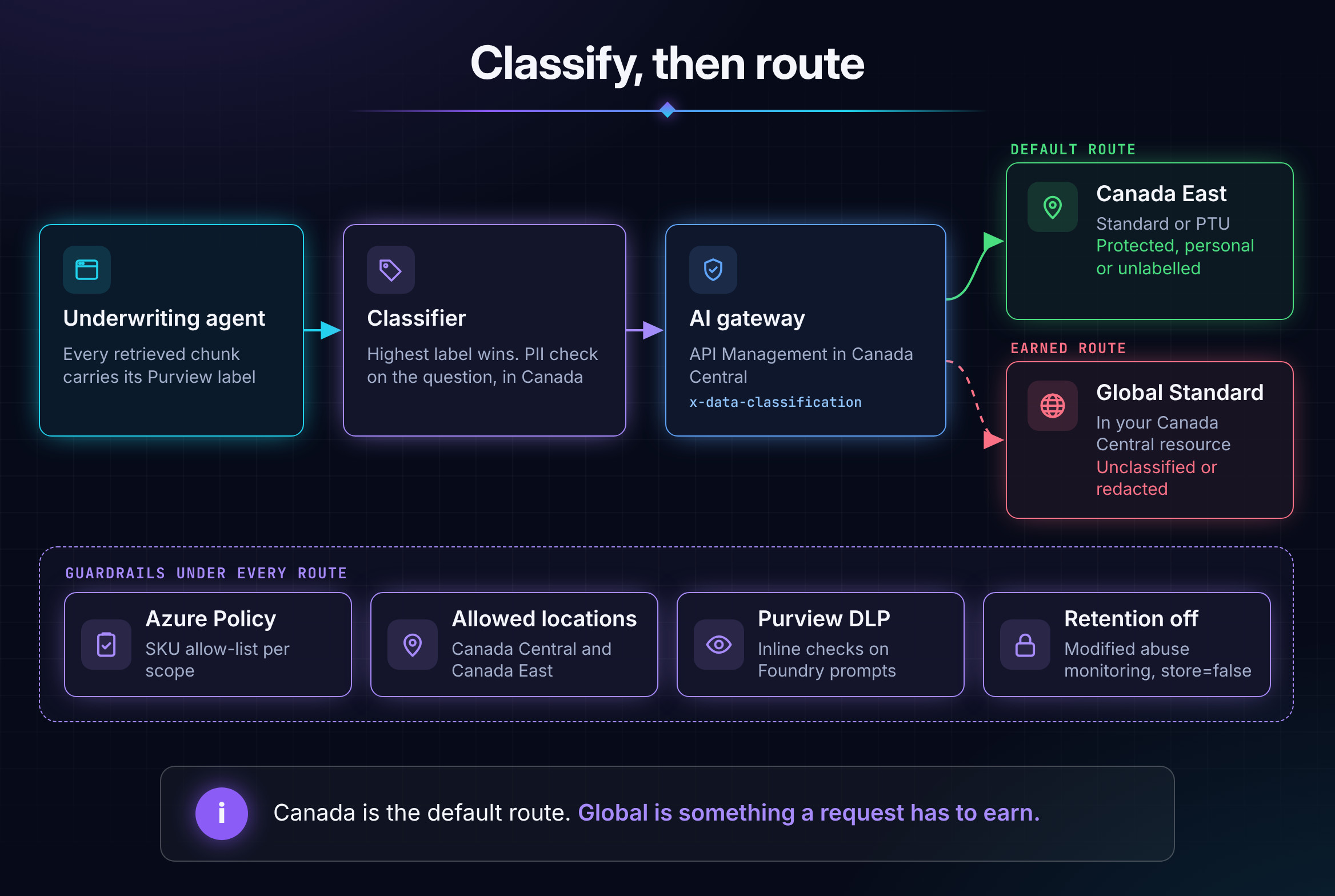
Two deployments, one name. Put a Standard or PTU deployment in a Canada East resource and a Global Standard deployment in your Canada Central resource, and name both chat. A shared name lets the gateway swap backends without rewriting request bodies. Send all embeddings to Canada East; the text-embedding-3 models are available there, so your index doesn't change.
Label-aware retrieval. Azure AI Search can ingest Microsoft Purview sensitivity labels from Blob Storage, ADLS Gen2, OneLake and SharePoint and enforce them at query time. The feature is in preview. Each chunk comes back with its label, so the app knows the most sensitive thing it's about to put in a prompt.
A high-water-mark classifier. The most sensitive item in the prompt decides the route, and anything unknown counts as protected:
from azure.ai.textanalytics import TextAnalyticsClient

GLOBAL_OK = {"<public-label-id>", "<general-label-id>"}   # Purview labels approved for Global
pii = TextAnalyticsClient("https://lang-cc.cognitiveservices.azure.com/", DefaultAzureCredential())

def classify(question, chunks):
    result = pii.recognize_pii_entities([question], language="en")[0]
    if result.is_error or result.entities:
        return "protected"          # personal information in the question, or no clear answer
    labels = {c.get("sensitivityLabel") for c in chunks}
    if chunks and labels <= GLOBAL_OK:
        return "unclassified"       # every chunk carries an approved label
    return "protected"              # unlabelled, unknown or sensitive

response = client.responses.create(
    model="chat", instructions=INSTRUCTIONS, input=messages, store=False,
    extra_headers={"x-data-classification": classify(question, chunks)},
)
In the underwriting example, Jordan Lee's name in the question is enough to keep the whole request in Canada. The client now points at the gateway instead of the Foundry endpoint. Deploy the Language resource in Canada Central so the PII check itself stays in Canada, and pass language="fr" for French content.
The gateway enforces it. The AI gateway in Azure API Management sits in Canada Central between your apps and both deployments. The policy defaults to Canada and switches to Global only when the request is marked unclassified and the calling app holds an app role you've granted for Global use. A missing or unexpected header lands in Canada.
<inbound>
    <base />
    <validate-azure-ad-token tenant-id="{{tenant-id}}" output-token-variable-name="jwt">
        <audiences>
            <audience>{{gateway-audience}}</audience>
        </audiences>
    </validate-azure-ad-token>
    <!-- Default route: Canada East resource, deployment named "chat" -->
    <set-backend-service backend-id="foundry-canada-east" />
    <choose>
        <when condition="@(context.Request.Headers.GetValueOrDefault("x-data-classification", "protected") == "unclassified")">
            <choose>
                <when condition="@(((Jwt)context.Variables["jwt"]).Claims.GetValueOrDefault("roles", "").Contains("AI.Global.Allowed"))">
                    <!-- Earned route: Canada Central resource, Global Standard deployment named "chat" -->
                    <set-backend-service backend-id="foundry-global" />
                </when>
            </choose>
        </when>
    </choose>
    <authentication-managed-identity resource="https://cognitiveservices.azure.com" />
</inbound>
Guardrails that don't depend on memory. Three controls keep the pattern honest when someone is in a hurry:
- Azure Policy as an allow-list. Microsoft's sample policy denies
GlobalStandard. An allow-list also catchesDataZoneStandard,GlobalBatch,DeveloperTierand whatever ships next. - Allowed locations pinned to Canada Central and Canada East. Foundry keeps adding ways to call models without a deployment. Instant access (preview) runs from projects in West US 3 and creates no deployment for your SKU policy to inspect. Microsoft also lets you switch it off by policy.
- Purview inline DLP for Foundry prompts. It's rolling out to general availability through October 2026 and evaluates prompts to Foundry apps and agents against your DLP policies. Treat it as a backstop behind the router.
The allow-list policy:
{
  "mode": "All",
  "policyRule": {
    "if": {
      "allOf": [
        { "field": "type", "equals": "Microsoft.CognitiveServices/accounts/deployments" },
        {
          "field": "Microsoft.CognitiveServices/accounts/deployments/sku.name",
          "notIn": "[parameters('allowedSkus')]"
        }
      ]
    },
    "then": { "effect": "deny" }
  },
  "parameters": {
    "allowedSkus": {
      "type": "Array",
      "defaultValue": ["Standard", "ProvisionedManaged"]
    }
  }
}
Assign it at the management group, list the one subscription that hosts the Global deployment under notScopes, and give that subscription its own assignment that also allows GlobalStandard. Then apply for modified abuse monitoring, keep store set to false, and keep prompt content out of telemetry unless your records schedule calls for it.
What should you check in your own tenant this week?
Start by finding the deployments that aren't regional. Run this in each subscription:
az cognitiveservices account list --query "[].[name,resourceGroup,location]" -o tsv |
while read -r name rg loc; do
  az cognitiveservices account deployment list -n "$name" -g "$rg" \
    --query "[?sku.name!='Standard' && sku.name!='ProvisionedManaged'].{account:'$name', region:'$loc', deployment:name, model:properties.model.name, sku:sku.name}" \
    -o table
done
Then work through these:
| Action | Owner | Notes |
|---|---|---|
| Move embedding deployments to Canada East Standard | Cloud Platform | Embeddings carry the whole corpus |
| Assign the SKU allow-list and allowed-locations policies | Cloud Governance | Use notScopes for the one Global subscription |
Apply for modified abuse monitoring and set store to false | AI Platform Owner | Limited Access form, through your Microsoft account team |
| Decide in writing which labels may go to Global | Privacy Office and Security Architecture | The label list is the policy; the gateway only enforces it |
| Route every model call through the gateway | AI Platform Owner | Disable public network access on Foundry resources and allow only the gateway |
Framework alignment, for the conversation with your auditor:
- NIST CSF 2.0: GV.OC-03, ID.AM-07, PR.DS-01, PR.DS-02, PR.DS-10
- NIST SP 800-53: SA-9(5) processing, storage and service location; AC-4 information flow enforcement
- ISO/IEC 27001:2022 Annex A: 5.12 classification of information, 5.14 information transfer, 5.23 cloud services, 5.34 privacy and protection of PII, 8.12 data leakage prevention
- OSFI Guideline B-10: third-party and cloud arrangements, for federally regulated insurers
Three questions for your next architecture review
The headline holds whichever model you run: your resource region tells you where data rests, and the deployment type tells you where it's processed. Canada Central on a diagram answers only the first question. Global Standard is the cheapest and newest capacity Microsoft sells, and for unclassified work it's the right call. The risk is sending everything there because that's where Microsoft's guidance tells you to start. Route by classification instead: Canada by default, Global for the data you've approved for it.
Take these into the room:
- Which deployment types do our model deployments use today, embeddings included?
- Which data classifications are approved for processing outside Canada, and who signed that decision?
- What stops a new deployment from changing the answer tomorrow?
If the honest answer to the third one is "nobody would notice," that's the gap to close this quarter.
If you're working through the same conversation with your own privacy team, or you've built a routing pattern that works differently, reach out. I'm always glad to compare notes.
Sources
- Microsoft Learn: Understanding deployment types in Microsoft Foundry Models
- Microsoft Learn: Region availability for Foundry Models sold by Azure
- Microsoft Learn: Foundry Models lifecycle and support policy and Model retirement schedule
- Microsoft Learn: Data, privacy, and security for Azure OpenAI in Foundry and Abuse monitoring
- Microsoft Learn: Azure OpenAI v1 API
- Microsoft Learn: Data, privacy, and security for Document Intelligence
- Microsoft Learn: Data, privacy, and security for Claude models in Microsoft Foundry
- Microsoft Learn: Control model deployment with custom policies
- Microsoft Learn: Instant access to models in Microsoft Foundry (preview)
- Microsoft Learn: AI gateway capabilities in Azure API Management
- Microsoft Learn: Ingest Purview sensitivity labels in Azure AI Search (preview)
- Microsoft 365 Message Center: Inline DLP for prompts in Microsoft Foundry apps and agents (MC1304291)
- Microsoft Azure: Data residency in Azure
- Microsoft On the Issues: Microsoft deepens its commitment to Canada
- Microsoft 365 Blog: In-country data processing for Microsoft 365 Copilot
- Office of the Privacy Commissioner of Canada: Guidelines for processing personal data across borders
- McCarthy Tétrault: Sweeping privacy reform comes into force in Quebec
- Torys: OSFI B-10: Third-party risk management
- Shared Services Canada: Question Period Note: Digital sovereignty (February 2026)
- Balsillie Papers: Whose Law Governs Canadian Data? (March 2026)