
What Entra ID Will Never Give You Back
30 days
Recycle bin window
14
No-recovery scenarios
0
Backups Microsoft holds for you
A stale-device cleanup job ran over a weekend in a large public-sector tenant. It removed a few hundred device objects that had not checked in for ninety days, which is exactly what it was written to do. On Monday, a user returning from extended leave hit a BitLocker recovery prompt on a laptop that had been sitting in a drawer the whole time. The recovery key was stored against the device object. The device object was gone. So was the key, and so was everything on that machine.
Nobody made a mistake. The script did precisely what it was told. That is the part worth sitting with.
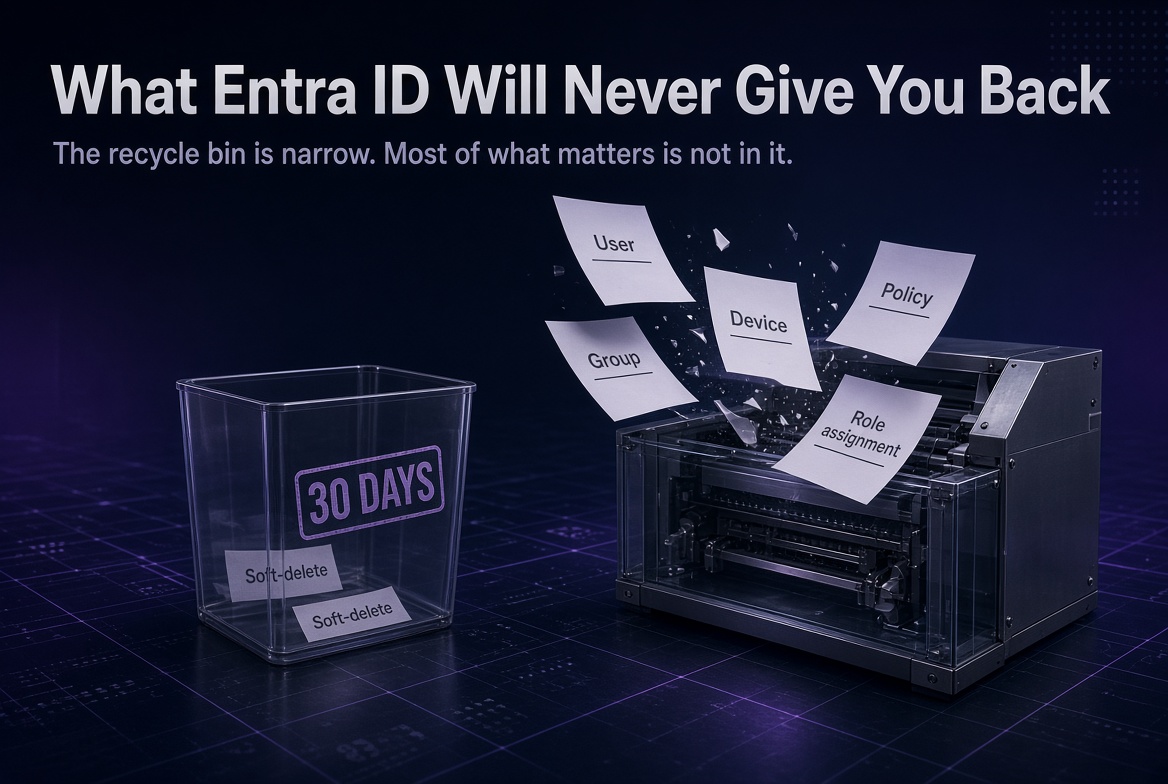
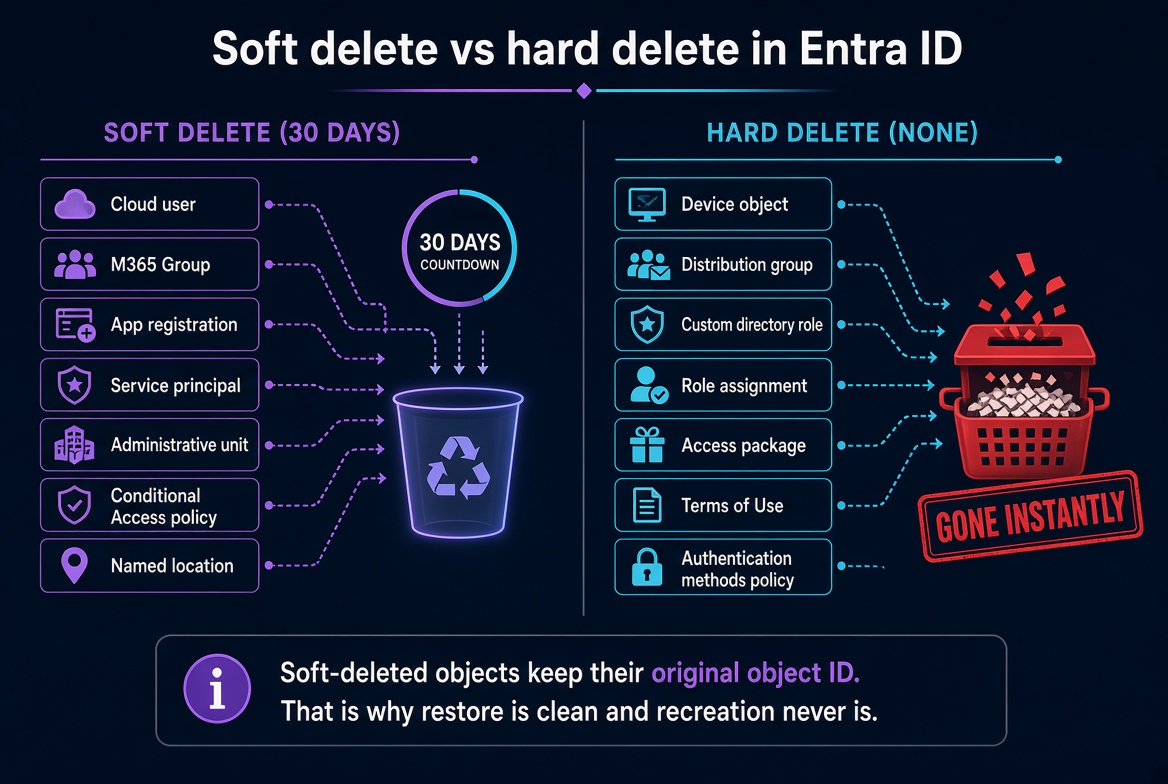
Most of what you delete in Entra ID does not go to a recycle bin. It goes through a shredder. The recycle bin is real, but it covers a specific and surprisingly short list of object types for exactly 30 days. Everything else is destroyed the instant the delete goes through: no undo, no support escalation, no backup held by Microsoft on your behalf.
The 30-day window is not configurable, and Microsoft support cannot extend it or restore past it. Recoverability in Entra ID is something you engineer into the tenant. It is not something the platform hands you.
Which objects actually go in the recycle bin?
This is the table worth pinning above your change-approval process. Everything in bold is gone the moment it is deleted.
| Object type | Deletion behaviour | Recovery window |
|---|---|---|
| Cloud-only user (member or guest) | Soft delete | 30 days |
| Microsoft 365 Group | Soft delete | 30 days |
| Cloud security group | Soft delete (preview, public cloud only) | 30 days |
| Application registration | Soft delete | 30 days |
| Service principal | Soft delete, Graph only | 30 days |
| Administrative unit | Soft delete, Graph only | 30 days |
| Conditional Access policy | Soft delete | 30 days |
| Named location | Soft delete | 30 days |
| Distribution group / mail-enabled security group | Hard delete | None |
| Custom directory role | Hard delete | None |
| Role assignment (permanent or PIM eligible) | Hard delete | None |
| Access package, catalog, access review | Hard delete | None |
| Terms of Use policy | Hard delete | None |
| Device object | Hard delete | None |
| Authentication strength, authentication methods policy | Hard delete or overwrite | None |
| Cross-tenant access settings | Overwrite | None |
| All other object types | Hard delete | None |
Soft-deleted objects keep their original object ID and their properties. That single fact is why a restore is clean and a recreation never is, and it is the hinge that the next three sections turn on.
Entra recoverability behaviour changes often. This reflects the platform as of September 2026. Verify against Microsoft Learn, "Recover from deletions in Microsoft Entra ID," before you build a recovery runbook on top of it.
Why isn't recreating the account the same as restoring it?
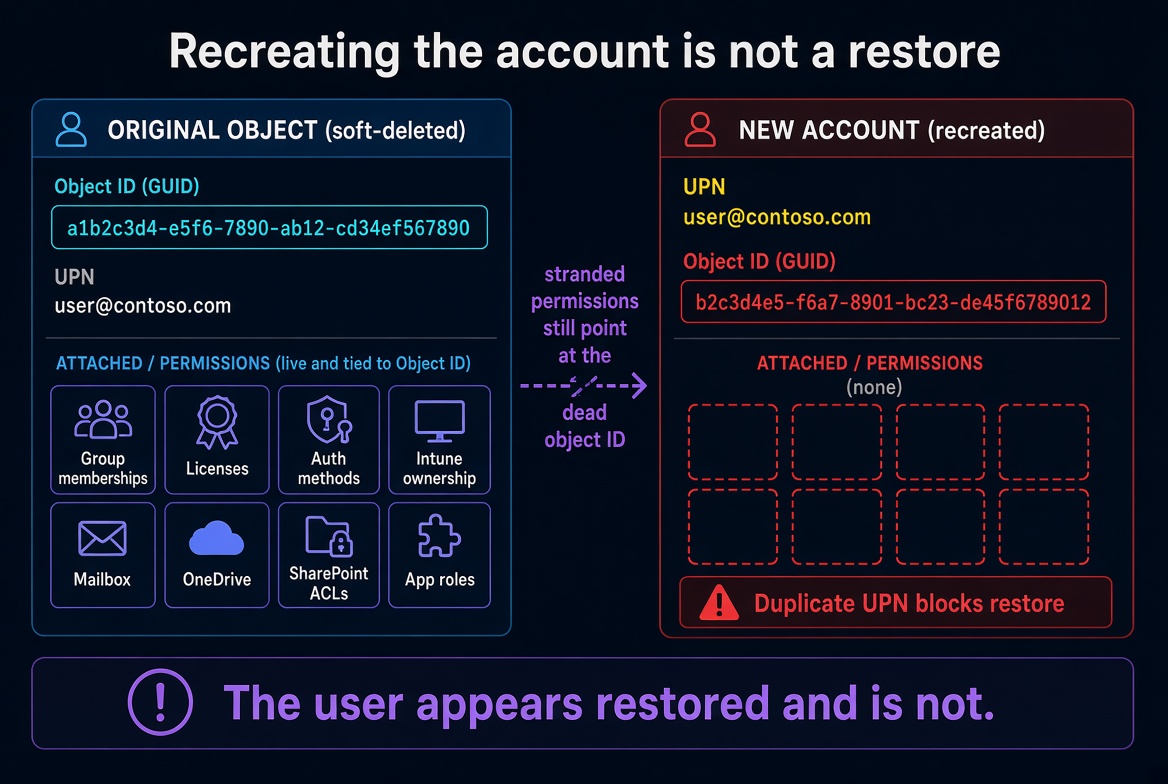
Because you did not recover anything. You created a new object that happens to share a name.
The service desk cannot find the restore option, so they create a fresh account with the identical user principal name. The user signs in. Everyone closes the ticket. Meanwhile the group memberships, license assignments, registered authentication methods, Intune device ownership, mailbox, OneDrive, and every resource-level permission are still attached to the dead object ID. The user appears restored and is not. Restoring the original afterwards now fails too, because the duplicate holds the UPN and mail nickname.
The same trap has three faster variants:
- Deleted more than 30 days ago. The object aged from soft delete to hard delete automatically. The clock started at deletion, not at ticket creation.
- Permanently deleted from the Deleted Users view. An administrator tidies the list, or a hygiene script calls the Graph
permanentDeleteaction. That bypasses the remaining retention entirely. - Purged at scale by automation. Anything holding
User.ReadWrite.Allor the User Administrator role can do this in a loop. A bad filter purges hundreds of accounts in minutes.
Either way, every SharePoint ACL, Exchange delegation, Teams membership, app role assignment, and Power BI ownership pointing at that object ID is orphaned. If the account was the sole owner of an app registration or a group, that thing is now ownerless.
Make "check the deleted users list first" a mandatory, blocking step in the account creation runbook. It is the cheapest control in this article.
Which deletion destroys data, not just access?
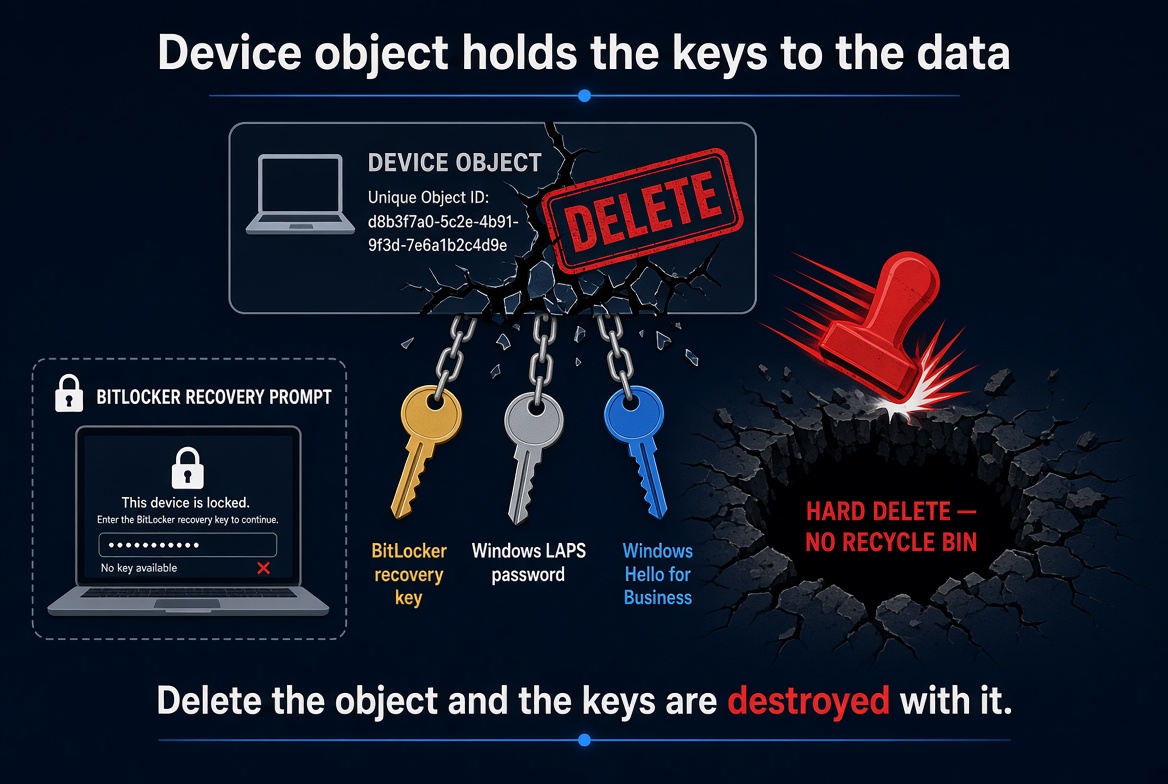
Device objects. This is the one that turns an identity cleanup into permanent data loss, and it is the scenario from the opening.
The BitLocker recovery key and the Windows LAPS local administrator password are stored against the device object. Delete the object and both are destroyed with it. A user who then hits a recovery prompt has no key and no path to the data. Windows Hello for Business registrations go too, forcing re-enrollment. Device objects are hard deleted, so there is no window in which any of this can be undone.
Two controls, both worth doing before your next cleanup cycle:
- Export BitLocker recovery keys to a separate protected store, on a schedule, independent of Entra.
- Set the stale-device threshold well beyond the longest realistic offline period, including parental and medical leave.
What happens when the deleted object is a group?
It depends entirely on the group type, and the audit log will not tell you which type it was.
Distribution groups and mail-enabled security groups are hard deleted. The Entra recycle bin covers Microsoft 365 Groups and cloud security groups only. Membership is lost with no export, and while the audit log records the delete event, it does not record the membership list. There is nothing to rebuild from inside Microsoft's tooling.
Security groups are only conditionally safer. Soft delete for security groups is a preview capability limited to public clouds, with documented exclusions including EDU tenants using OneDrive for Business storage and tenancies using audience targeting with classic web parts. Where it does not apply, two consequences follow:
- Group-based licensing. Members lose licenses immediately. Exchange Online mailboxes enter a 30-day grace period and are then deleted. An identity mistake becomes permanent data loss on a second timer most people do not know is running.
- Conditional Access assignment. A policy targeting a deleted group loses its target. It may now apply to nobody. Worse, if the group was an exclusion, the policy may now apply to accounts that were deliberately excluded, including service accounts and break glass.
Mark critical groups as role-assignable. Only Privileged Role Administrator and Global Administrator can modify or delete a role-assignable group, which closes most accidental deletion paths in one move.
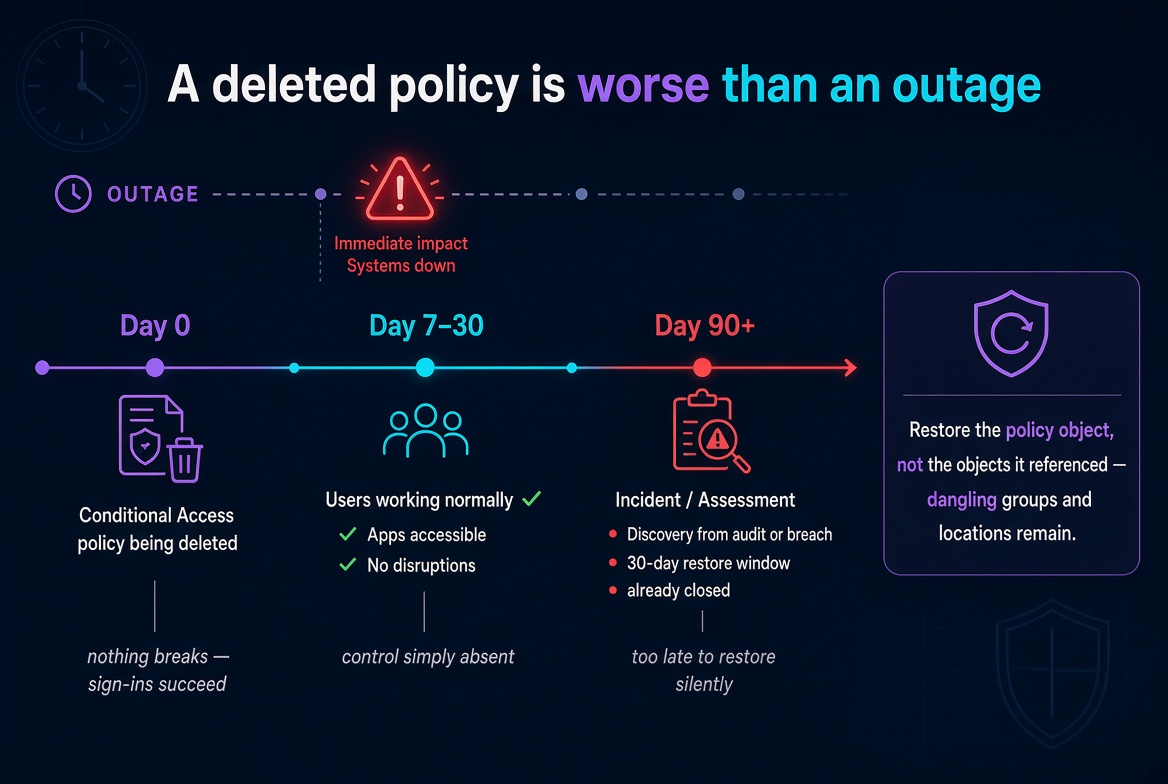
Why is a deleted policy worse than an outage?
Because an outage tells you. A missing control does not.
Delete a Conditional Access policy and nothing breaks. Sign-ins succeed. Users keep working. The control is simply absent, and discovery comes from an assessment or an incident rather than from monitoring, often a quarter later when the 30-day soft-delete window has long since closed. An administrator can also permanently delete a policy from the deleted items collection before the window expires.
There is a subtler failure inside the window too. Restoring a policy restores the policy object, not the objects it referenced. If the target group, named location, or application was also deleted, the restored policy carries dangling references and may not enforce what its name implies. Restore into report-only mode, validate against sign-in logs, then enable. Never restore straight to enforced.
Tenant-wide singleton configuration is the most consequential version of this problem. The Authentication Methods policy, cross-tenant access settings, authentication strengths, user settings, and external collaboration settings are single tenant-level objects. There is no delete event to recycle and no version history, so a change simply overwrites the prior state. Turning off a method restriction, loosening guest invitation permissions, or relaxing a cross-tenant inbound trust changes the posture of every user at once, silently.
What about privileged access, governance, and break glass?
All hard deleted, and the losses are evidentiary as much as operational.
Custom role definitions, role assignments, and PIM eligibility and role settings have no recycle bin. When they go, so does the record of who held privilege, under what conditions, and with what approval and MFA requirements. You cannot rebuild the prior access model, and you cannot evidence it to an auditor.
Entitlement management objects behave the same way. Delete an access package or catalog and you remove the governance wrapper while existing assignments may persist as raw group memberships with no lifecycle attached. That is worse than having no access package at all, because access is now both permanent and ungoverned. Deleted access review definitions take their decision history with them, which breaks recertification evidence outright.
Break glass accounts deserve their own paragraph. The user object is restorable for 30 days, but the credential material is not: FIDO2 registrations and the stored password are tied to the object, and a recreated account means everything is reissued and resealed. If that coincides with a Conditional Access lockout or a federation failure, your way back into the tenant is a support escalation and a lengthy ownership verification. Exclude these accounts from every lifecycle automation by explicit object ID, never by naming convention, and alert on any change to them.
Can't I rebuild it from the audit log?
Usually not, for two independent reasons.
Retention runs out first. Entra audit logs hold 7 days without a licensed plan and 30 days with Entra ID P1 or P2. Late discovery means the events are already gone from the service.
Even inside retention, the log records the act, not the state. A delete event tells you an object was deleted. It does not contain the object's prior configuration, and a group delete event does not contain the membership list. Microsoft support cannot supply it either.
Two more cases catch teams the same way. A restored service principal comes back, but client secret values are never retrievable in plaintext once created, and provisioning job configuration and sync cycle state do not survive, so a SCIM integration re-runs a full initial cycle with all the downstream change volume that implies. And tenant deletion is final once the process completes, with no restore at all.
What to engineer before the next cleanup job runs
Start here. These are cheap, and every one of them prevents a scenario above.
| Action | Owner | Notes |
|---|---|---|
| Exclude break glass accounts from all lifecycle automation by object ID | IAM Operations | Not by naming convention |
| Mark critical security groups as role-assignable | IAM Operations | Restricts deletion to Privileged Role Administrator and Global Administrator |
| Add "check the deleted users list first" to the account creation runbook | Service Desk | Prevents the recreate-instead-of-restore failure |
| Alert on Delete and Hard Delete events for users, groups, policies, and devices | Security Operations | Prioritize policy and role object types |
Then fund these. They are the ones that actually give you a rollback.
| Action | Owner | Notes |
|---|---|---|
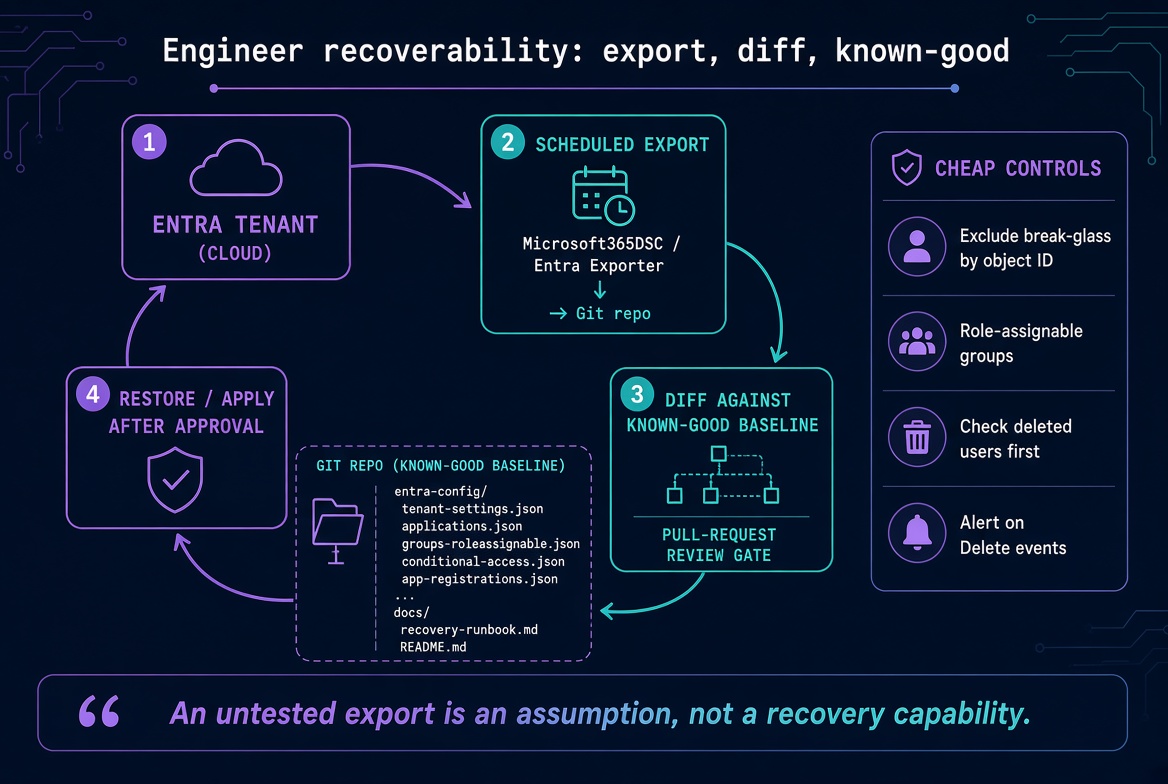
| Export tenant configuration to version control on a schedule | Security Architecture | Microsoft365DSC or Entra Exporter, with scheduled diff |
| Export BitLocker recovery keys to an independent protected store | Endpoint Management | Before any stale device cleanup runs |
| Stream Entra audit and sign-in logs to Sentinel with retention set to your records schedule | Security Operations | Removes the 30-day reconstruction cliff |
| Define and document the known good state, including group type per group | Security Architecture | Audit logs do not distinguish group type on delete |
| Manage Conditional Access as code with a review and approval gate | Security Architecture | Terraform or Microsoft365DSC |
| Add a weekly review of the soft-deleted objects list with defined restore criteria | IAM Operations | Catches deletions before the 30-day cliff |
Framework alignment, for the version of this conversation you have with an auditor:
- NIST CSF 2.0: PR.DS, PR.AA, RC.RP
- NIST SP 800-53: CP-9 (system backup), CP-10 (system recovery), AU-11 (audit record retention), AC-2 (account management)
- ISO/IEC 27001:2022 Annex A: 5.16 identity management, 5.18 access rights, 8.13 information backup
- CIS Microsoft 365 Foundations Benchmark: administrative account and logging sections
Four questions to take to your own tenant
The headline holds regardless of how mature your identity program is: Entra ID's recycle bin covers a short list for a fixed 30 days, and everything outside that list is engineered recoverability or nothing at all. The tenants that survive a bad cleanup script are the ones that exported their known good state before they needed it.
Take these four to your next identity operations review:
- Is the cloud security group soft delete preview active in this tenant, and does the tenant fall under any of the documented exclusions?
- What is the current Entra log retention in Sentinel, and does it meet your applicable records schedule?
- Which automation identities currently hold delete permissions on users, groups, devices, and policies?
- Is there an existing export of tenant configuration, and when was a restore from it last tested?
If the answer to the fourth one is "we have an export, but we have never tested a restore," you do not have a recovery capability yet. You have an assumption. Test it this quarter.
If you want to compare notes on how you have handled tenant configuration as code, or you have hit a recovery scenario that belongs on this list, reach out. I am always glad to hear how this plays out in someone else's environment.